.jpg.d60aebfe05ee93b3118173a18a1bcd63.jpg)
GU264
Members
-
Joined
-
Last visited
Reputation Activity
-
 GU264 got a reaction from Rumcajs in New to Mypatrol 4x4My name is Rich, and like many of you I have a passion for my Patrol, I have made some good modifications and some bad modifications over the past few years. I like working on cars and do everything I can with my rig.
The story of my Patrol.
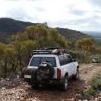
I have a gold 1999 gu patrol that strated life as 2.8TD, the engine was a little tired, so I decided to do a engine swop and install a ls77 (installed a bigger cam in the engine for more low down power and a bunch of other bolt on goodies). I also installed a 4.2 ledgendery gearbox and drive shaft as I still wanted a manual. I also installed a S/S patroldoctor snorkel and airbox. I have a 3" lift kit with a set of 33 mud tyres, a 3" custome made exhust with exstractors and all the usual bolt on stuff like lights and winch. I dyno tuned it when it was finished and was happy with the results, but I will get a few more kW with a few other modifications that dont cost a lot of money.
I have set up my rig for more touring than to have supper flex.I still have a few modifications to go before I can say she is finished, I am working on for my next project is a reverse scoop, has any one done one for ther patrol?
I only have pictures of my engine bay and not what my rig looks like sorry for that
Look forward to getting to know a few of you and drawing from the members experiance and knowledge and helping if I can with some of my experience.