boxxy
Members
-
Joined
-
Last visited
Reputation Activity
-
 boxxy got a reaction from BigGQWesty in Boxxy's PatrolLED were a kit from fleabay and drawers were done by a guy on the gold coast so I cant take credit for either of them
Did make my own cargo barrier though and very happy with the outcome
-
boxxy got a reaction from Rumcajs in Boxxy's PatrolThanks for that !
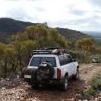
Couple of photos of my rig
When we first got it
With lift and roof rack
With winch and bar fitted as she is now
And my LED'S at night with my drawer system
Also fitted
Uniden UHF radio
Sony Stereo
DIY cargo barrier
Dual battery system wired to rear Anderson plugs
2 3/4 Mandrel exhaust by Speedy Exhausts
ARB under bonnet compressor
Cooper Tyres
Rear LED work/reversing light
Reversing Camera
Still to come:
Air Locker
DP Chip
Rear wheel carrier
I think thats it